
Justflows 0.3.7: Helpdesk, quotes and shared files, a real block library, and network-wide plugins
Customer accounts that plugins build on, a Helpdesk that routes mail across sites, a full block library, network-wide plugin hooks, core updates that roll back on failure, and custom domains that just work.
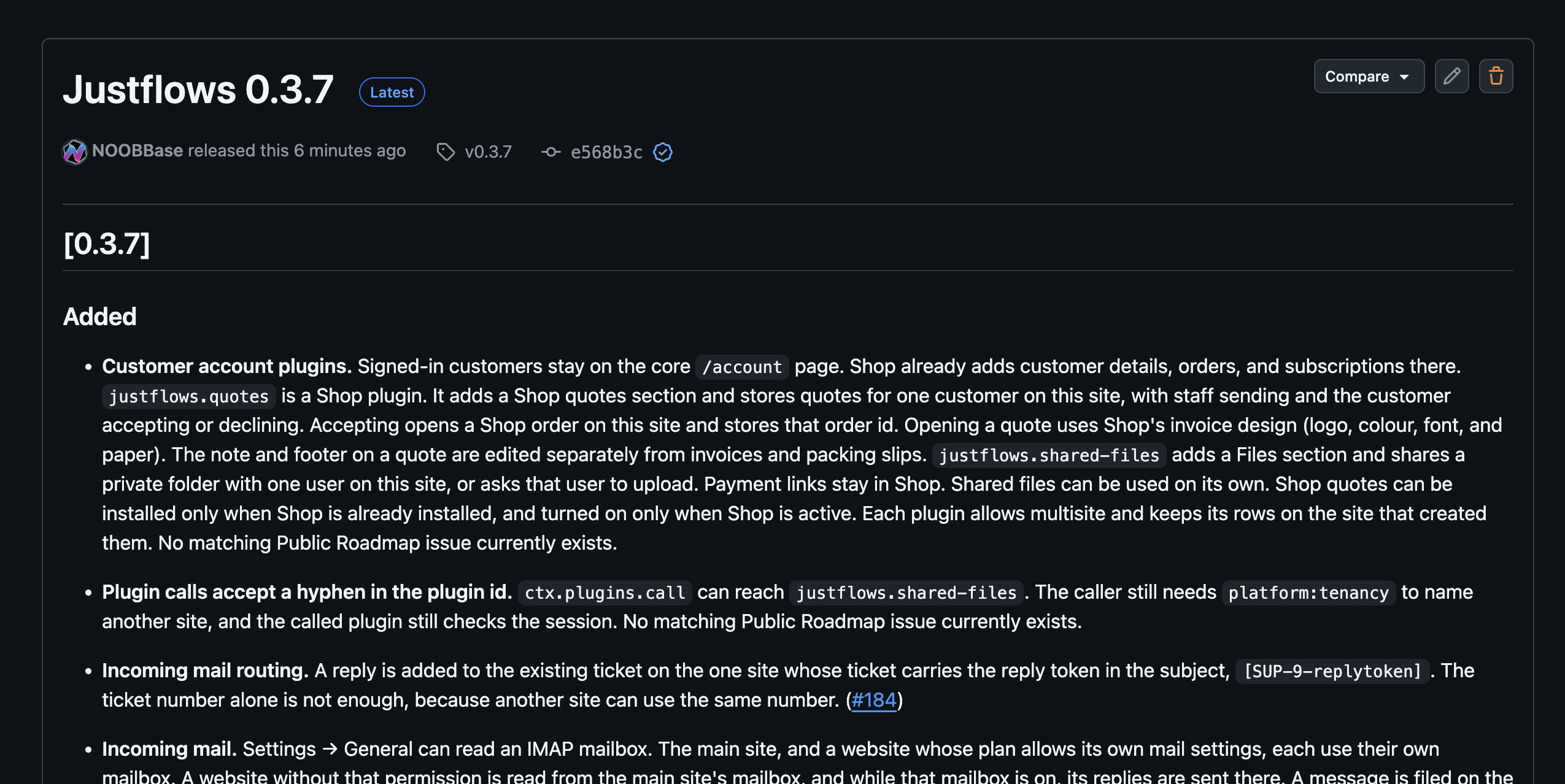
Justflows 0.3.7 is out. It is a big one: two weeks of work that turn the account page into a place plugins can build on, take Helpdesk from a first version to a desk we run our own support on, add a real block library to the page builder, and give plugins a way to act on every site in an installation at once. Under the hood, core updates now recover from failure, and custom domains finally behave the way you expect. This post goes through all of it, including the parts that need your attention before you upgrade. The full changelog is on GitHub.
Before you upgrade: Analytics moved into its plugin
One change in 0.3.7 is not backwards compatible, so it goes first. Until now, core recorded page views, served
/justflows-analytics/collect and /api/analytics, rendered the Analytics admin page and the Google tag, and shipped the analytics_summary MCP tool with an analytics:read capability. All of that has left core. The Analytics plugin, version 0.2.0, now does it itself, through the same public SDK every other plugin uses.- If your site uses Analytics, update the plugin to 0.2.0 together with core. With the old plugin on the new core, page views are no longer recorded.
analytics:readis no longer a core capability, andanalyticsis no longer a reserved API namespace.- The
analytics.headfilter is now seeded with an empty string. A tag plugin appends its snippet at a priority below 100, and a consent plugin gates the result at the default priority, so consent always gets the last word. - The plugin adds a main-site network tag: one measurement tag on every site's public pages and admin, set once on the main site. That is built on the new network hooks described further down.
Why move it at all? Core should not know about any specific plugin. Analytics was the last feature that lived half in core and half in a plugin, which meant core carried tables, routes and a capability that only made sense with one plugin installed. Moving it out forced us to add the SDK features it needed, and those are now available to everyone.
Customer accounts become a place for plugins
Signed-in customers already had a core
/account page, and Shop already added customer details, orders and subscriptions to it. In 0.3.7 two new first-party plugins use the same account sections, and show what a plugin can do with them.Quotes
justflows.quotes is part of the shop. It adds a Quotes tab in Shop and a Quotes section in the customer's account. The flow is the one you would expect from a B2B sale, and nothing more:- Staff open Create quote, pick the customer by name or email, and add lines: a published product from this site's shop, or a custom line with its own title and price. A quote can also carry custom text, which the customer sees on the quote and on the quote document.
- The email to the customer links to the quote on this site. Opening it uses Shop's invoice design, so logo, colour, font and paper size match your invoices. The note and footer on a quote are edited separately from invoices and packing slips.
- The customer accepts or declines. A decline can include a note, also on a quote that was declined earlier. Staff see that note and can start a follow-up, which opens a new editable quote based on the old one.
- Accepting opens a real Shop order on this site and stores its id on the quote. The customer gets a pay link that starts a Mollie payment. If an attempt is not completed, the same link starts a new one, and the order shows Pay in their account while it waits for payment or after a failed attempt.
- In the admin, Quotes copies that payment link instead of opening checkout, so staff never accidentally pay the customer's order themselves.
Quotes depends on Shop: it cannot be installed until Shop is installed on the site, and it cannot be turned on until Shop is active. Each quote belongs to one customer on one site, and the rows stay on the site that created them, also on a multisite installation.
Shared files
justflows.shared-files adds a Files section to the account page. Staff share a private folder with one user on the site, or ask that user to upload something: a contract to sign, a logo for a print job, a set of photos for a listing. Shared files is its own item in the admin sidebar and works without Shop. Uploads go to the storage the site uses under Settings → Storage, so a site with its own S3 connection keeps these files in its own bucket. Payment links stay in Shop; Shared files is only about files.Building these two plugins also fixed a small core issue:
ctx.plugins.call now accepts a hyphen in the plugin id, so other plugins can reach justflows.shared-files. The rules for that call did not change. Naming another site still needs platform:tenancy, and the called plugin still checks the session itself.Helpdesk grows into a full support desk
We introduced Helpdesk last week in Helpdesk: support tickets inside your Justflows site, and it ships with this release. Since that post, it picked up the pieces that separate a ticket form from a desk you can run a business on. Here is what is new and why it works the way it does.
Incoming mail, routed to the right site
Settings → General can now read an IMAP mailbox. The main site has its own, and so does every website whose plan allows its own mail settings. A website without that permission is read from the main site's mailbox, and while that mailbox is on, its replies are sent there too. A message is filed on the site that claims it, otherwise on the one site whose address it was sent to, and the same message is never filed twice.
POST /api/mail/inbound still accepts pushed mail if you prefer a provider webhook.The interesting part is matching a reply to its ticket. On a multisite installation, two sites can both have a ticket number 9. So reply mail now carries a token in the subject, like
[SUP-9-replytoken], and a reply is only added to a ticket on the one site whose ticket carries that exact token. The ticket number alone is never enough. A reply without a matching token can open a new ticket instead of landing in someone else's conversation.Sensitive replies, and keys nobody has to create by hand
Staff can mark a reply or a file as sensitive. Its text is encrypted at rest, the customer email leaves it out, and only staff who are allowed can press Reveal. Every reveal is recorded, and expired sensitive data is destroyed on schedule.
Encryption needs a key, and asking every self-hoster to generate one and paste it into
.env is how features end up silently broken. So 0.3.7 adds a generic host feature for it: through the operatorKey.ensure hook, a plugin asks the host to create a 32-byte key in the installation .env when it is missing. The key name has to belong to the calling plugin, an existing valid key is never replaced, the value is never returned to the plugin, and it is never stored in the database. Helpdesk uses it for JUSTFLOWS_HELPDESK_KEK, so sensitive replies work on a fresh install without anyone editing a file.Its own database, if you want one
When Helpdesk is installed, the main site chooses where its records live: the current Justflows database, or a separate PostgreSQL, MySQL or MariaDB database. You can change your mind later. Moving is deliberately careful:
- Helpdesk backs up its records and creates its tables in the new database.
- It restores the data and checks every table against the source.
- It switches only when everything matches. The old copy stays where it was.
- A destination that already holds different Helpdesk records is left untouched, so pointing it at the wrong database cannot overwrite anything.
Orders from every shop in the workspace
Support often lives on a different site than the shop, sometimes on a different hostname. On a ticket, staff now see that customer's Shop orders from every active site in the same workspace, with number, status, total, items and, when Shop sends them, tracking. The order stays on the site that took it; the order number opens it in Shop on that site. Refund and Return buttons were removed from this list on purpose: money moves in Shop, not in the helpdesk.
Running the desk
- Reports first. Opening Helpdesk shows ticket counts, open and unassigned tickets, tickets past their target, first-response time, satisfaction, the last two weeks, and how often shop customers contact you. The Inbox is the next tab.
- SLAs in business hours that pause while a ticket is pending on the customer. Assignment by round-robin, by load, or by language.
- Bulk actions and saved views. Set priority, assignee or tag, or close several tickets at once. A canned reply can set those fields too.
- Nudges. Quiet customers get a reminder (which they can stop), and untouched new tickets are raised. Agents choose which notices they receive.
- Thread tools. Split a message into its own ticket, link tickets, drop files on a reply, and save a public thread as a help article. Staff can mask text before a ticket is published, and public tickets accept a +1.
- Escalation. Any site can escalate a ticket to the platform desk, and the main site can write an internal note back. The Network tab lists tickets on the other sites in the installation.
- Shop events. Order events are stored for guest order lookup, a failed payment can open a ticket, and account pages and blocks can start a ticket about a specific order or product.
- Helpdesk now has its own item in the admin sidebar instead of sitting in the Extensions top bar.
A block library you can build real pages with
The page builder had the basics. 0.3.7 adds the blocks you reach for on every second page, and makes sure each one renders safely on the public site, works with a keyboard, and has editor controls that make sense.
- Structure: nested lists and checklists, editable tables, Details and Accordions, keyboard-accessible Tabs, Cards, Buttons, Icons, and dismissible notices.
- Media: image and video Covers, Media & Text, and new Video, Audio and File download blocks with captions, playback controls, video posters and sizing.
- Site blocks that stay live: Site Logo, Title and Tagline, Navigation, Breadcrumbs, Social Links and a Table of Contents (this post uses one).
- Content Query: lists of published content with filters, sorting, pagination and layout controls, so an archive or a "latest posts" strip is a block, not a template edit.
Same-page anchor links are now preserved, so a navigation item that points at
#pricing keeps working in themes.Settings that only show what applies
More blocks means more controls, and a sidebar that shows every control for every block is useless. All 51 core blocks now have explicit inspector rules. Duplicate and ineffective generic controls are hidden. Theme styling shows a curated set plus any overrides you already made, instead of the full catalog of theme variables. Block-specific fields follow the choice that controls them: video settings only appear on a video Cover, numbering settings on a numbered list, pagination settings when pagination is on.
Two safety rules came with that. Hiding a control never deletes what it saved; an existing value stays visible so you can clear it. And a block with a style variant defined by its schema hides the generic styling controls that would overwrite it. Plugin blocks get the same treatment: they can declare their own
inspector switches.Light and dark in the builder
In dark mode, the builder's side panels, block library, inspector and pattern previews showed white boxes. Worse, the canvas mixed the theme's light colours with parts of its dark palette, and placeholders used admin colours instead of the site's. The canvas now previews the site in one chosen scheme, with a Light/Dark switch in its toolbar, and selection outlines and hints follow the previewed scheme so they stay readable.
Content types you can configure, not just create
Content type settings got a proper screen: a table overview, and a two-column editor for labels, descriptions, cache policy, system fields and custom fields, with expandable field settings, ordering, and a warning before you leave with unsaved changes.
More importantly, behaviour that used to be hard-wired per type is now a setting on each type: plural labels, dashboard shortcuts, which editor it uses, whether revisions are kept, previews, inclusion in public search, SEO metadata and sitemap inclusion, and comments. Existing types inherit exactly the behaviour they had before, so nothing changes until you change it. This is the one database migration in this release:
0050_content_type_settings.Plugin SDK 0.1.7: hooks that span the whole network
Some features are not per site. A measurement tag for the whole installation, a support button in every site's admin, a notice the operator wants everywhere. Until now a plugin could only do that by being activated on every single site, and every site admin could switch it off again. SDK 0.1.7 adds a proper answer.
A plugin with the new
platform:network permission can register a hook with { network: true }. That handler then runs on every site while the plugin is active on the main site, including sites that never activated it. Everything else about the plugin stays per site: its other hooks, routes and jobs, and inside the network handler, ctx.settings and ctx.data still belong to the site serving the request.// manifest.permissions includes "platform:network"
async activate(ctx: PluginContext) {
// Runs on every site while the plugin is active on the main site
ctx.hooks.filter("admin.body", async (html) => {
const label = await ctx.network?.mainSiteSettings.get<string>("buttonLabel");
return label ? `${html}<support-button label="${label}"></support-button>` : html;
}, { network: true });
}ctx.network.mainSiteSettings.get()reads the plugin's main-site settings from any site, read-only. That is how the operator's choice reaches every site without another site's admins seeing or changing it.ctx.network.sites()lists every live site, main site first. It only works on the main site and rejects anywhere else.- Files those hooks load from
/ext/<plugin id>/are served on every site, so a script injected network-wide also loads network-wide. - A route can return
revalidate: "network"to drop every site's page cache after saving something network hooks inject. Without the permission, or off the main site, it acts liketrue.
Analytics 0.2.0 uses this for its network tag, and Helpdesk uses it for the support button in other sites' admin.
More for plugin authors
page.viewedaction. Fires after a visitor receives a public page, with the path, locale, content id, user agent, referrer and host. It does not fire for previews, error pages, or the static exporter's crawl, so you count people, not tooling. This is what Analytics now records with.req.trustedOrigin. Plugin routes can see whether theOriginheader is the site itself or an origin the host's CORS allow-list vouches for, instead of each plugin parsing headers its own way.operatorKey.ensure, described above, for plugins that need a secret key in.env.- Content Security Policy hosts. A plugin can add the hosts its pages load to the site's CSP. The Stripe Buy Button now adds
https://js.stripe.comand Stripe's checkout frames and API, so it works on sites with the default policy. Onlyhttps://origins are accepted. inspectorswitches for plugin blocks, and hyphenated plugin ids inctx.plugins.call.
ctx.hooks.action("page.viewed", async (view) => {
  // Real visitors only: no previews, error pages or export crawls
  await ctx.data.put("views", crypto.randomUUID(), { path: view.path, referrer: view.referrer ?? null });
});
Core updates that clean up after themselves
Updating from the admin used to install dependencies and build in place. If the build or a migration failed halfway, you could be left with a site that did not start. 0.3.7 changes the order of operations:
- Dependencies are installed and the build runs in a staging directory, before any live file is touched.
- Core files and dependencies are backed up first. If activation or migrations fail, they are restored and the restart is skipped, so the running site keeps running.
- The previous release is kept under
.updates/previous-releasefor manual recovery. - Database migrations that were already applied are kept. Migrations only move forward.
This applies from the next update onward: the updater that runs is the one in the version you are updating from. Updating to 0.3.7 still uses the 0.3.6 updater, so take your usual backup this time.
Custom domains, fixed properly
Connecting your own domain on Justflows Cloud, or any installation behind Bunny, ran into a group of problems that all came from the same fact: the admin stays on the platform address, while the public site is served from your domain. To a browser, those are two different sites.
- Security headers include the connected domain.
script-src 'self',connect-src 'self'andframe-ancestors 'self'blocked the admin from loading the domain's scripts, calling its extension endpoints and framing it for previews. Connected addresses are now part of those policies. The public page dropsX-Frame-Options: SAMEORIGIN, which cannot name the platform address and still refused the preview, andCross-Origin-Resource-Policybecomescross-originwhen the addresses are not the same site. A domain still waiting for DNS is not added. - The theme preview stays next to the admin. A
?preview=1request now stays on the address it was opened on, instead of being redirected to the primary domain where the editor's session does not exist. - Static exports no longer loop. After a custom domain became primary, the exporter followed the redirect, kept only its path, and saved
/as a page that refreshed to/. The crawl now stays on the host it fetched. - Own-DNS domains get a certificate sooner. A domain with records at your own DNS provider is added to the pull zone once its TXT record is present, and the free certificate is requested then. It no longer has to wait for one lookup of the CDN hostname to match the flattened ALIAS address.
- The domain check asks your nameservers. A bare domain could stay on "does not point at the target" while a public resolver cached the old address, or while the CDN pool answered with a different address. The check now asks the domain's own nameservers and accepts CDN addresses from several answers.
Space Voyage, and scripts for themes
The Space Voyage theme ships with its complete editable Planet Jumping homepage: the preloader and docking logo, the canvas portal with pointer tilt, the Mars → Earth → Venus video transitions with frozen backgrounds, planet facts, custom cursor and responsive layouts. To make that possible without giving themes free rein, active themes can now ship bounded client scripts, served through
/theme.js. Sites that already saved a homepage can insert the updated landing pattern instead of losing their edits. The theme's behaviour tests moved to the theme registry, so CE CI no longer needs external theme files.Smaller things worth knowing
- No more React Router fingerprint. Technology scanners read
window.__reactRouterVersionfrom the admin bundle and reported the exact release. That value is no longer set, and the version token is gone from the license banner. The copyright notice stays. - Quota forms with many meters save again. Website limits and defaults with more than 50 fields, including fields left unlimited, now save. Every meter, scope and value is still validated.
- Account pages save with their locked cache policy. Saving an account page such as Quotes no longer fails because it stores the private cache policy. A public policy is still refused.
- Leaner admin bundles. Block and validation code is split out of the builder chunk, and self-contained server-rendered modules are separated.
- Dependencies. pnpm 12.15.0, Turborepo 2.11.10, Vitest 5, EJS 7, React 19.3 and Vite 8.3, refreshed transitive dependencies, and an updated
ip-addresssecurity override.
Upgrading
Three things to check:
- Analytics users: update the Analytics plugin to 0.2.0 together with core.
- One migration:
0050_content_type_settings. Existing content types keep their behaviour. - Back up first. The new recovering updater is used from the next update on, not for this one.
The release ZIP comes with a SHA-256 checksum, a signature and a CycloneDX SBOM, all attached to the GitHub release. If something breaks, open an issue on GitHub or a ticket on support.justflows.com, which, as of this release, runs on everything described above.
Read the full changelog✌️
Thanks for reading!
Find more posts on the blog or star Justflows on GitHub.