
Justflows 0.4.2: passkeys, a shared object cache, and easier site setup
Administrators and members can sign in with passkeys, a plugin can now back the object cache with a store every process shares, and adding a site can reuse an administrator you already have. Plus a way to get your site addresses emailed, and two fixes.
Justflows 0.4.2 is out. It is a smaller release than 0.4.1, with two headline features: passkey sign-in for everyone who has an account, and an object cache that several application processes can share through a plugin. Running a workspace with several sites also got a little easier.
Passkeys for administrators and members
Staff add passkeys under Security → Your account, and members add them on their account page. Adding one asks for the current password, and each passkey can be renamed or revoked. Revoking a passkey signs out every other device by default.
- Passwordless or as a second factor. Sign in with a passkey through a button or the email field's autofill, or use it as the second factor after a password.
- No lockouts. The first passkey creates recovery codes, which you can regenerate. A recovery code, or a password reset followed by one, gets you back in after losing a passkey. When everything is lost, an administrator can remove a user's passkeys, authenticator app and recovery codes from Edit user.
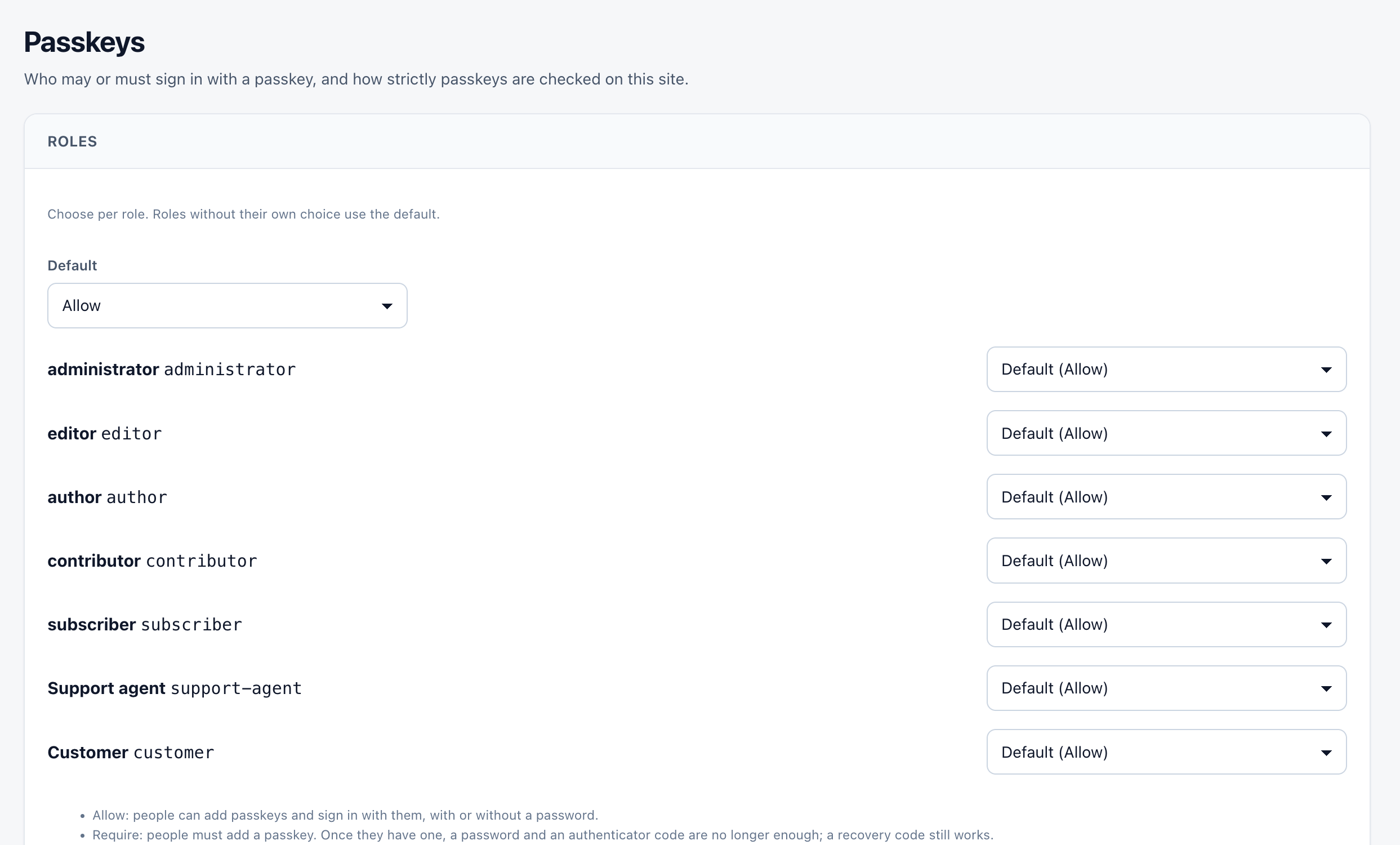
- A policy per role. Security → Passkeys sets whether each role may, must or may not use passkeys, plus user verification, attestation (
none, ordirectwith an AAGUID allow-list), and the RP ID and extra origins. - Careful by default. Challenges are single-use and expire after five minutes, a signature counter that goes backwards is refused, and every step is rate limited and recorded in the audit log. Security Center counts passkeys as administrator MFA.
Verification uses Node's built-in crypto, so passkeys add no new dependency.
A shared object cache through plugins
Until now, each application process kept its own object cache. With
ctx.cache.registerStore (SDK 0.1.9, new cache:store permission), a plugin can offer a store that Admin → Tools lists as a cache driver. Several processes then share cache entries and invalidations.A store fails safe. Until it is ready, and during an outage, the cache is bypassed instead of failing requests: a failed read is a miss and a failed write is skipped. After a lost invalidation, the cache stays bypassed until the store is cleared, so no visitor sees stale content. Tools and Site Health show the store's status.
The first plugin to use it is Redis Cache, which we introduced in Redis Cache: one shared object cache for every Justflows process.
Adding sites and finding them again
- Reuse an administrator for a new site. In an isolated workspace, Admin → Platform → Add a site offers the administrators of the workspace's sites, including sites on a separate database. The account is copied onto the new site with its password, so nobody types it in again. After that the two accounts are separate.
- Forgot your site address? Owners can have it emailed. The email lists every site in the workspaces they own, with its address and its admin sign-in address. The answer is always the same, so it never reveals whether an email address has an account, and requests are limited per address.
Fixes worth knowing about
- Saving Tools → Performance suite no longer takes the site down when Node was started with flags. The restart dropped flags such as a TypeScript loader,
--env-fileor a heap size. It now keeps them, except debugger and watch flags. - No more Settings button that leads to an empty page. A plugin page only links to its Settings page when that page has a settings form or sub-pages.
Upgrading
- One database migration:
0056_webauthnadds the passkey credential and challenge tables. It runs automatically. - Cache driver: the unimplemented
redisdriver andCACHE_REDIS_URLare gone from core. An unknownCACHE_DRIVERnow falls back tofilesysteminstead of failing at startup. For a shared cache, install a plugin that provides a store and select it in Admin → Tools. - Permissions-Policy: the recommended policy now allows passkeys on the site itself (
publickey-credentials-get=(self)). A saved policy that still has the old shipped value is upgraded automatically. If you edited yours, add that value yourself before using passkeys. - Behind a reverse proxy, the passkey RP ID and origins follow
TRUST_PROXY.
The release ZIP comes with a SHA-256 checksum, a signature and a CycloneDX SBOM, all attached to the 0.4.2 release on GitHub. Sites on 0.2.7 or later check the signature before they install an update.
Read the full changelog✌️
Thanks for reading!
Find more posts on the blog or star Justflows on GitHub.