Content visibility: members-only and subscriber-only content in Justflows
Justflows now decides who can view each piece of content. Restrict a whole content type or one entry to roles, named users, or, with Shop, customers who have an active subscription. The same answer applies to every page, list, search result and API response.
Until now, published content in Justflows was public. You could keep something as a draft or schedule it, but once it was live anyone could read it. That made members-only articles, subscriber downloads pages or a paid course hard to build without a custom plugin.
Justflows now has content visibility: one set of rules, the same for every content type, that decides who can view each entry. Shop plugs straight into it, so content can be limited to customers with an active subscription.
Who can view what
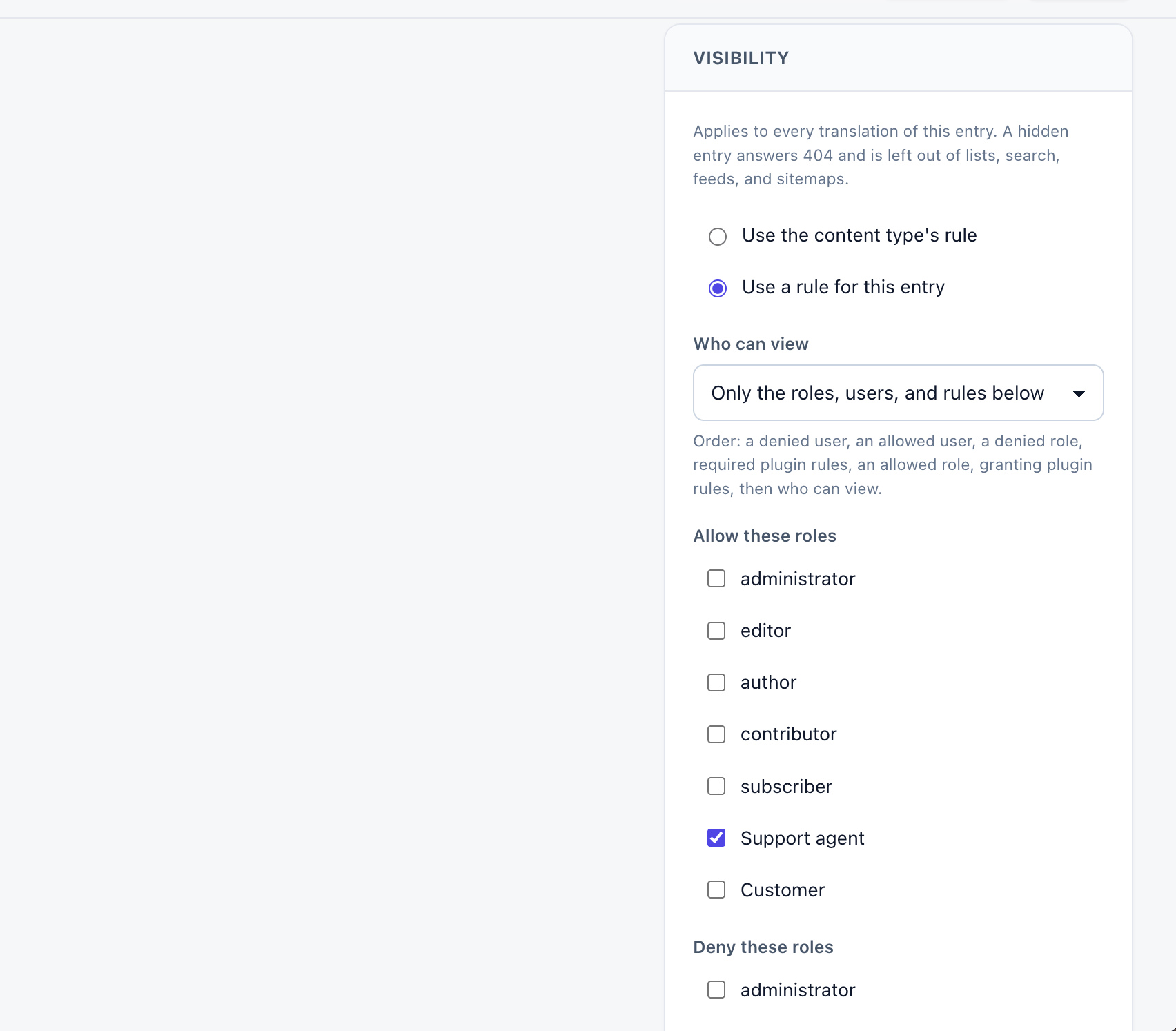
Every content type can have a default rule under Content Types → the type → Visibility. Any entry can replace that default with its own rule in the editor's Visibility panel. An entry's rule applies to all of its translations, so one language can never show what another hides.
A rule says who can view the content:
- Everyone, signed-in users, or only the roles, users and rules you name.
- Allow and deny lists for roles, such as letting Members in but keeping Trial accounts out.
- Allow and deny lists for individual users, for a guest author, a client or a single reviewer.
- Plugin rules, such as Shop's Active subscription rule below.
When rules overlap, the order is fixed and shown under the rule: a denied user, an allowed user, a denied role, plugin rules that must pass, an allowed role, plugin rules that let the viewer in, and finally who can view. Naming a person always wins, because you chose that person directly.
Visibility is separate from editing permissions. An editor or administrator browsing the public site sees what their role is allowed to see, the same as anyone else.
Subscriber-only content with Shop
Shop adds an Active subscription rule. Add it to a content type or a single entry and pick a plan: one of your subscription products, or Any subscription plan.
A signed-in customer can view the content while their subscription to that plan is active, has a payment due, or is cancelled but still running to the end of the paid period. These are the same states in which Shop keeps a plan's roles and limits in force. When a subscription is put on hold, paused, cancelled or ends, the content closes again.
Nothing has to be synced by hand. The rule reads the customer's subscriptions when they visit, so a renewal, a failed payment or a cancellation is reflected on the next page view. It works the same for subscriptions Shop runs itself and for ones run by Stripe Billing, and for plans staff give out or assign as a default plan.
You can combine it with the other settings. Set the rule to Must pass to require a subscription on top of everything else, or to Lets the viewer in so subscribers and, for example, your Staff role can both read the content.
A hidden entry stays hidden everywhere
A visitor who can't view an entry gets the same result as if it didn't exist. Its URL, its old and translated URLs and
?p=<id> return 404. It is left out of the public API, site search, blog lists, query blocks and term archives, including their totals and page counts. Menu links to it are removed, and comments on it are refused.Sitemaps, feeds, static exports and content that plugins read are always worked out for an anonymous visitor, so restricted content never ends up in a file that gets shared. Pages with a rule are never stored in the page cache, by a CDN or in a static export, and saving a rule clears the cached copies.
Editors can still preview their work. And Check access in the Visibility panel tells you whether an anonymous visitor, a role or a specific user can view the entry, and which rule decided.
Rules from your own plugins
Shop's rule is built on the same public API any plugin can use.
ctx.visibility.registerRule in plugin SDK 0.1.8 adds a rule type with its own settings and an evaluator that answers allow or deny with a reason code.Plugins only get what they need to decide: the site, the entry's metadata, the viewer's id and roles, and the saved settings. They never see the entry's body, the viewer's email or name, or any secrets. If a rule's plugin is turned off, throws an error, takes longer than a second or gives an invalid answer, the content stays hidden. Failing closed is the safe default for content someone paid for.
Worth knowing
- Visibility hides the entry, not its files. An image or download stays reachable for anyone who already has its
/uploads/link. Use private plugin files for paid downloads. - A hidden entry returns a 404. Teasers, "subscribe to read" pages and paywalls are planned as part of the wider rule builder.
- Turning Shop off hides content whose Active subscription rule must pass, until Shop is back or the rule is removed.
- Checking access for a role always says no subscription, because a role isn't a customer. Check a specific user instead.
Try it
Content visibility arrives with plugin SDK 0.1.8, and the Active subscription rule with the next Shop release. The visibility documentation covers rule order, caching and the plugin API, and the Shop documentation covers subscriber-only content. Questions or problems go to support.justflows.com.
The work is tracked in issue #283.
View Shop in the marketplace✌️
Thanks for reading!
Find more posts on the blog or star Justflows on GitHub.